In the ever-evolving world of digital marketing, Facebook stands out as a dominant platform for businesses seeking to strengthen their online presence. With its massive user base and advanced targeting capabilities, Facebook offers two primary advertising tools: Facebook Boost and Facebook Ads Manager.
Choosing the right tool can significantly impact your campaign success. This guide breaks down both options to help you make the best decision for your business.
What Is Facebook Boost?
A Simple Tool Designed for Quick Promotion
Facebook Boost is an entry-level advertising feature that helps you promote existing posts directly from your Facebook Page. It expands your post’s visibility beyond your current followers, making it ideal for businesses seeking quick engagement without technical complexities.
When Facebook Boost Works Best
-
Time-sensitive promotions
-
Small businesses with limited budgets
-
Users with little advertising experience
-
Quick visibility for events, offers, or announcements
How Facebook Boost Works
Easy and Fast Setup
Boosting a post is incredibly simple. Click “Boost Post”, choose your:
-
Target audience
-
Budget
-
Duration
Facebook automatically handles the rest.
Basic Targeting Options
While simplified, Boost still lets you target by:
-
Location
-
Age
-
Gender
-
Basic interests
Preset audiences make the process fast and beginner-friendly.
Advantages of Facebook Boost
1. Simplicity
User-friendly and requires no advanced marketing knowledge.
2. Speed
Campaigns can go live within minutes—perfect for urgent promotions.
3. Direct Engagement
Boosted posts appear directly in newsfeeds, generating quick likes, shares, and comments.
Limitations of Facebook Boost
1. Limited Targeting
Only basic filters are available—less effective for niche or refined audiences.
2. Less Control
Few customization and optimization options compared to Ads Manager.
What Is Facebook Ads Manager?
A Complete Solution for Advanced Advertisers
Facebook Ads Manager is a powerful tool designed for businesses that want full control over their campaigns. It provides advanced targeting, detailed analytics, and multiple ad formats, making it ideal for maximizing ROI.
Perfect For
-
Data-driven marketers
-
Businesses with specific campaign goals
-
Advertisers needing precision targeting
-
Professional marketing teams
How Facebook Ads Manager Works
Accessing Ads Manager
You log in via the Business Ads Manager Facebook Login interface, where you can:
-
Create campaigns
-
Manage ads
-
Track performance in detail
Advanced Targeting Capabilities
Target users by:
-
Detailed demographics
-
Interests
-
Behaviors
-
Custom audiences
-
Lookalike audiences
A/B Testing for Better Performance
Ads Manager supports experimentation with images, videos, copy, and audience segments.
Advantages of Facebook Ads Manager
1. Advanced Targeting
Reach highly specific audiences based on granular data.
2. Detailed Analytics
Insights such as CTR, conversions, CPC, CPM, and engagement metrics.
3. Multiple Ad Formats
Video, carousel, slideshow, collection ads, instant experience, and more.
Limitations of Facebook Ads Manager
1. Complexity
Beginners may find the interface overwhelming.
2. More Time-Consuming
Campaign setup requires planning, testing, and analysis.
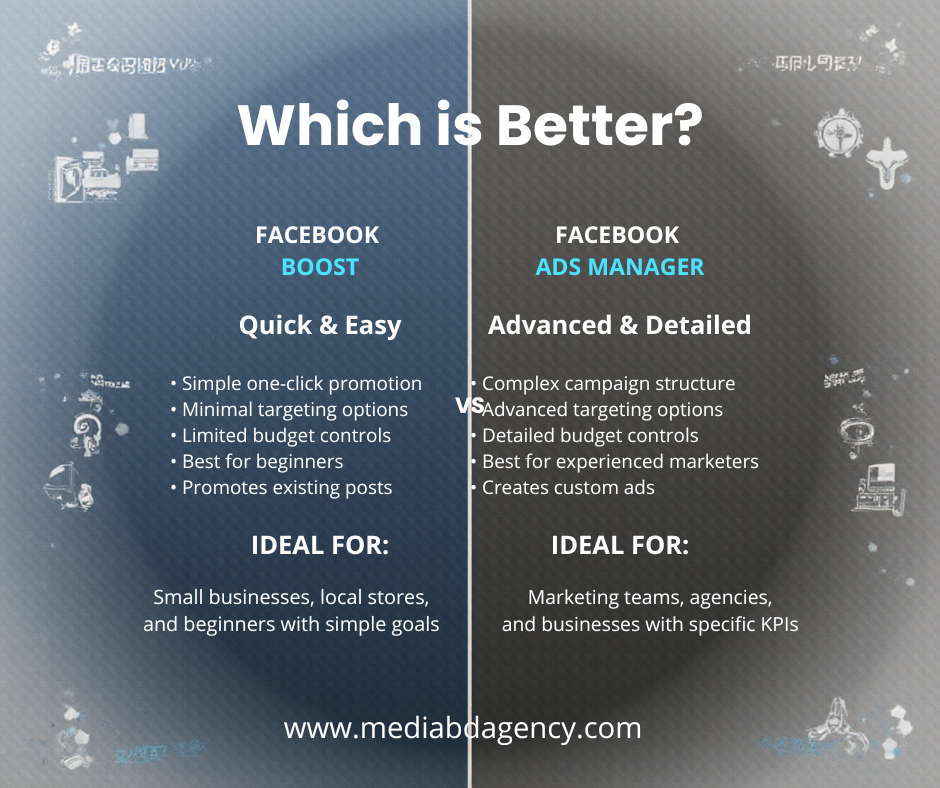
Facebook Boost vs. Ads Manager: The Key Differences
Customization & Control
-
Ads Manager: Full customization, detailed settings
-
Boost: Basic customization for quick use
Targeting Options
-
Ads Manager: Highly detailed
-
Boost: Broad, simplified
Analytics
-
Ads Manager: In-depth insights
-
Boost: High-level metrics only
Which Should You Choose?
Choose Facebook Boost If:
-
You need quick results
-
You want to promote an existing post
-
You have a small budget
-
You are new to Facebook ads
Choose Facebook Ads Manager If:
-
You want advanced targeting
-
You need detailed reporting
-
Your goal is conversions or sales
-
You want to scale your campaigns professionally
Tips for Optimizing Facebook Ads (Boost or Ads Manager)
Use High-Quality Visuals
Images and videos must be attention-grabbing.
Write Compelling Copy
Clear, persuasive text improves engagement.
Use Strong CTAs
Guide users to take action—”Shop Now,” “Learn More,” etc.
Test Multiple Formats
Experiment with videos, carousels, single images.
Monitor Performance Regularly
Data-driven decisions help reduce ad costs and improve results.
Stay Updated With Facebook Advertising Changes
Facebook constantly updates its advertising features. Follow official guides, join communities, and attend webinars to stay ahead.
Troubleshooting: When Ads Manager Is Down
Check:
-
Facebook Status Page
-
Community forums
-
Social media updates
Technical outages are common, and staying informed helps minimize disruptions.
Managing Message Templates in Ads Manager
To delete a template:
-
Go to Messages in Ads Manager
-
Select the template
-
Click Delete
-
Confirm deletion
Regular template updates keep your campaigns fresh and relevant.
Conclusion: Choosing the Right Tool for Your Business
Your choice between Facebook Boost and Facebook Ads Manager depends on your goals, budget, and experience.
-
If you want simplicity and speed: Choose Facebook Boost.
-
If you require precision and advanced control: Choose Ads Manager.
Success on Facebook comes from continuous learning, experimentation, and data-driven optimization. With the right strategy, both tools can help you grow your brand and achieve powerful results in the digital marketplace.
Explore Our Marketing Services
To improve your business performance, it is important to work with an experienced marketing partner in Bangladesh.
We provide digital solutions to increase visibility and leads.
Our social media services help you connect with customers effectively.
With our paid advertising services, you can reach the right audience quickly.
Our content publishing services also support brand growth.